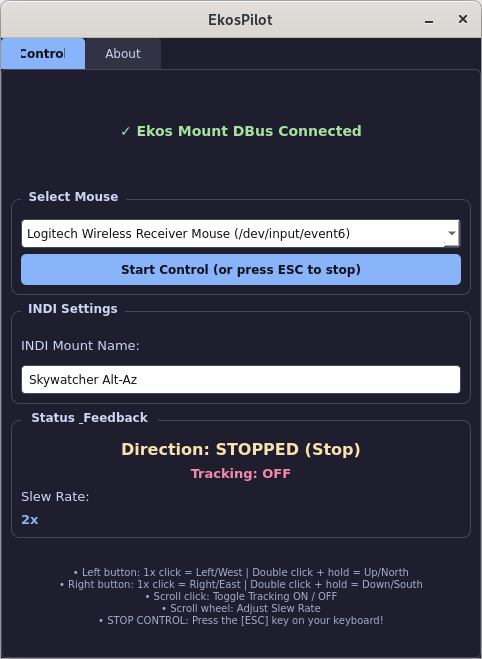
EkosPilot
EkosPilot is a lightweight helper utility for Kstars/Ekos that enables
direct movement of astronomical mounts using a simple USB/wireless mouse.
Main Features:
• Manual movement in 4 directions (N, S, E, W)
• Toggle Tracking ON/OFF with a single click
• Adjust Slew Rate with the scroll wheel
• D-Bus and INDI Socket protocol integration
• Automatic configuration saving
Developer:
• Dániel Horváth
• https://pushtosky.com/ekospilot.html
• info@pushtosky.com
User Guide Linux
1. Installing KStars and INDI Server
The easiest way to install the latest KStars and Ekos packages is from the official PPA repository (on Ubuntu/Debian-based systems):
sudo add-apt-repository ppa:mutlaqja/ppa
sudo apt update
sudo apt install -y kstars-bleeding indi-full
2. System Permissions Setup
EkosPilot uses the evdev library to directly capture mouse events. To run the application without requiring sudo permissions every time, add your user to the input group:
sudo usermod -aG input $USER4. Launching and Configuring KStars / Ekos
- Start KStars:
kstars - Open the Ekos window (Tools → Ekos).
- Create a new profile where your telescope mount is selected in the Mount field (e.g., Skywatcher Alt-Az).
- Start your Ekos profile by clicking the Start Ekos button (this launches the local INDI server in the background at
127.0.0.1:7624).
5. Using EkosPilot
Run the EkosPilot
- Check Connection Status: A green indicator confirms connection (
✓ Ekos Mount DBus Connected). - Mouse & INDI Settings: Select the control mouse and enter your INDI mount's device name.
- Start Control: Click the Start Control button.
6. Control Commands (Mouse Functions)
| Mouse Action | Function / Direction |
|---|---|
| Left Click 1x (Press & Hold) | Move West / Left |
| Left Click 2x Fast (Press & Hold) | Move North / Up |
| Right Click 1x (Press & Hold) | Move East / Right |
| Right Click 2x Fast (Press & Hold) | Move South / Down |
| Middle Click (Scroll Wheel Click) | Toggle Tracking ON / OFF |
| Scroll Wheel Up / Down | Adjust Speed / Slew Rate (1x, 2x, 4x, 8x, 16x) |
| Release Button | Immediate STOP |
ESC key on your keyboard!